Powered by Blogger.
Showing posts with label Social Worries. Show all posts

SEO For Google+ Posts: 5 Google+ Posting Tips Can Help You to Boost Your Post.

Thursday, 18 February 2016

Google+ SEO 

 Google+ is one of the best social network used for business purposes, you can make your business page in the G+ and promote it in your circle let people know your business and products etc.. Your searches on Google.com will deliver personalized results as the default. The people you have in your circles and the people you’ve been engaging with will be influencing those search results, as will the device you’re using.
Every Google Plus post title can surface in Search for the people in our circles, so grow your network and build your brand.
This personalization is getting super interesting especially when you take into account the next reason Google+ is so important…

Google + Posting Tips

1. Always use headlines

Using a headline can help you to index in search engines. Usually Google indexes the Google+ post title as keyword as helps people to find the post. Always use keyword related title for your Google+ post.
They incorporate your headlines into the title tag of the post.
The headlines are typically what display in Google search results.

2. Formating for fashion/Design

Use some text formats to design your texts, It will help you to attract on your post.

3. Use your own words

Use unique topics are articles for your posts, Don’t Use copied articles for your post. Using real contents can help you to index your post on Google.

4. Use Images/Photos

Using images can help you to attract people, people love to see images, Browse images and see images.

5. Use target Sharing

Target your post where you want to share.
This five Google posting tips can help you to boost your post performance and help you to index your post on Google Plus.
Read More...

VALENTINES DAY 2016: 20 FACEBOOK LOVE STATUSES. BEST LOVE FACEBOOK AND WHATSAPP STATUSS.

Friday, 12 February 2016

Best Facebook And Whatsapp Statuses.

1. What’s with all the hearts today?
2. Roses are red, violets are blue, daisies are white, sunflowers are yellow. This florist has everything.
3. My love for you is beyond words so don’t expect a Valentine’s Day from me.
4.  Roses are red, fitness is great I would’ve gotten you chocolate, but you need to lose some weight.

5. If you can’t celebrate Valentine’s Day with some you love, celebrate with alcohol and pizza.
Read More...

How To Create Facebook Fan Page ? Easy way to create facebook business page.(step byspep With Images)

Saturday, 5 December 2015

Facebook fan page for Business.

Creating Facebook business or fan page is very easy with this article by step by step images .Facebook fan page can help to promote Business, brand, to find new customers from worldwide, and for advertising.
If you want to create Facebook fan or business page, follow these easy steps and pictures…

Creating Facebook Fan Or Business Page..

Step-1 .Open Facebook home page.

Open a Facebook home page on your desktop.


Step-2.Log in to your Normal Facebook Account.


With your valid Email ID or phone number and password Log in to Facebook .


Step-3.Click on Pages.

After log in Facebook account click on pages .


Step-4.Click on Create a page.


Step-5.Click on you page category.

Select your page category.


Step-6.Write your page name.


Step-7.Write about your page in some words. 

Write about your page in some words .It will help to fans to like your page.If you don’t want  to write leave it with option skip .


Step-8.Upload  fan page profile picture.

Upload you page picture


Step-8.Click on skip.


Now Your Facebook Fan or business page is ready you can your friends to like your page.

Written By P.N Raju In Techworries
Read More...

How to delete facebook pictures ?Easy way to delete facebook Photos?.

Easy Way To Delete Facebook Pictures   (Step By Step With Images).

Do you want  to delete your facebook pictures ? You can learn very easily by step by step with photos in this article .I hope You will Enjoy…..

Step-1.Log in to your facebook Account.
Log In to your Facebook account with your Email Id or Mobile number  and password.


Step-2.Click on Your Name.

After successfully log in to you account click on your name.


Step-3.Click and select delete Option.


Step-4 Once again select delete post option.


Now your pictures was successfully deleted from facebook.


Written By P.N Raju In TechWorries


Read More...

How To Easily Upload Photos To Facebook ?

Easy Way To Upload Photos In Facebook.

Uploading photos in Facebook are very easy with this article .In this article you will see how to upload images or photos or pictures in Facebook timeline with step by step images.

Uploading new picture to Facebook Timeline.

Step-1.Open Facebook Log in page.


In your browser open a Facebook log in page.


Step-2 .Log in to your Facebook account.


Log in to your Facebook account with your valid Email id or phone number and password.
You Can Also Read : How  To  Start Blog Google’s Blogger?
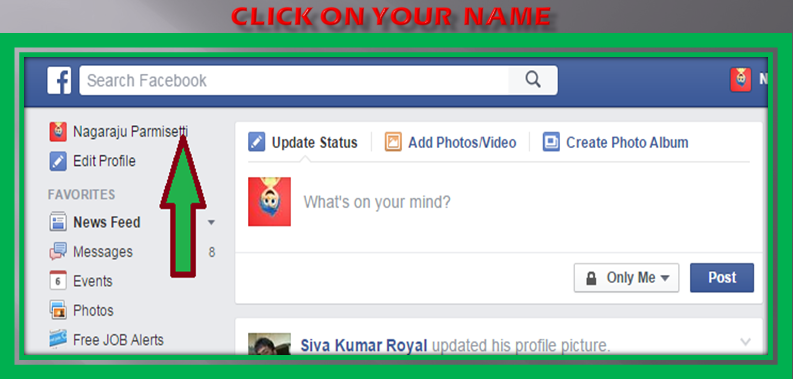
Step-3.Click on your name.

After successfully log in to facebook click on your name.


Step-4.Click Photo/Video.


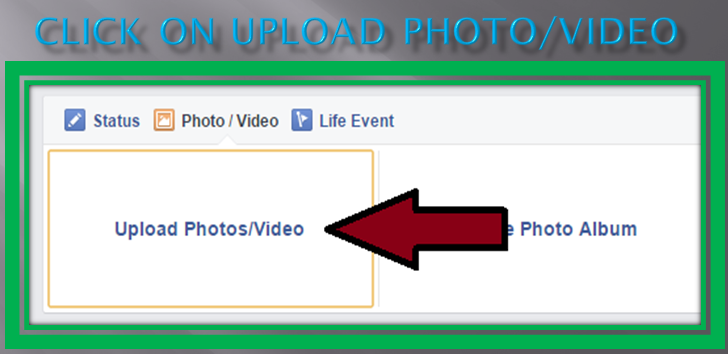
Step-5.Click on Upload photo/video.


Step-6.Choose Picture From your Computer .

After Click on Upload Photo select image from your computer and open it.

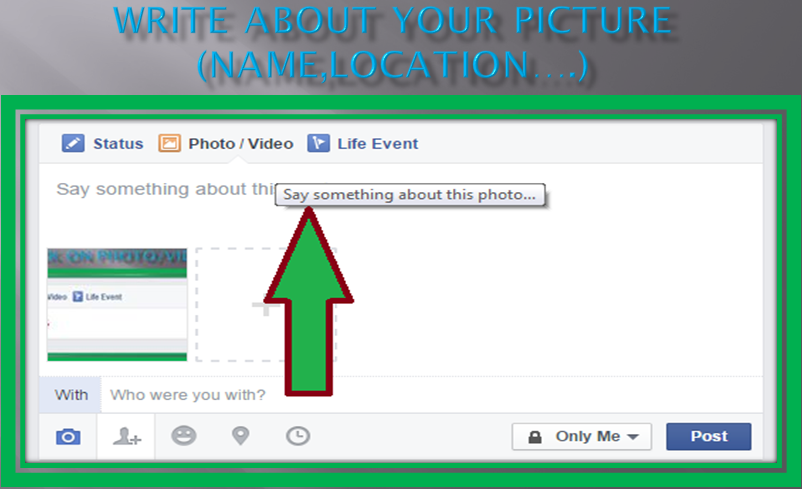
Step-7.Write about Picture.

Write something about your picture like name ,location of your picture , friends names of images.....


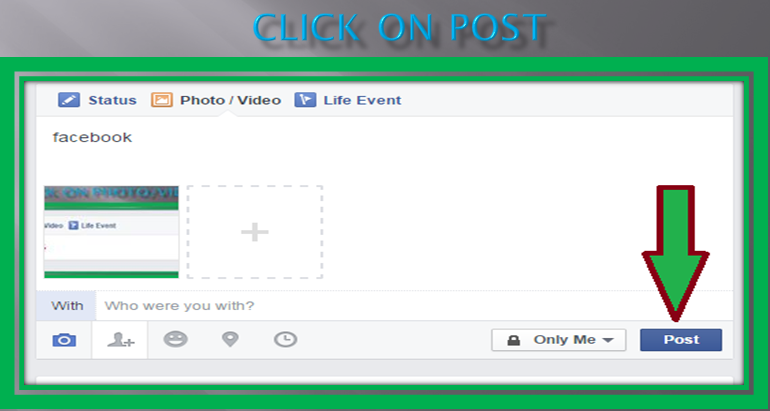
8.Click On Post


Now your picture was successfully completed uploading in facebook .


You Can Also Read : How To Create Facebook Account ?

Written By P.N Raju In TechWorries
Read More...

How To Make Facebook Account With Gmail?

Wednesday, 2 December 2015

How To Make Facebook Account With Gmail?

Do you want to create Facebook account  with G mail ? Do you have G mail ID? Lets read this article step by step .It is very easy and Facebook  Account creation is 100% free also .Once your account is created, you can upload  photos ,Videos ,texts ,Chat ,sharing interesting with friends and much more.  

Step-1 Open    FaceBook Home Page .

Open Facebook home page in your Browser .

Step-2 Write your Information.

In facebook home page write your first name ,Last name ,Email address ,Password ,Date of birth , and gender ( Male or female ) .Use your real name for your account .Nick names also allowed (Raj instead of Rajahs .It is example). 

 Step-3 click On Sign Up.


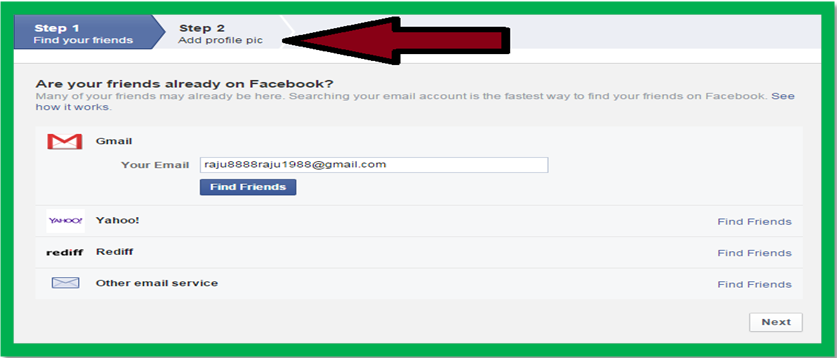
Step-4 Click On Step 2

You can import friends from Google,yahoo and other social sites. 


You can Also Read : How To Delete FaceBook Account?.


Step-5 click on Next marked with ''1'' in image .


step-6 It is your facebook account.

Before you use your account conform facebook mail in your Gmail.


After conformed your account you can use your facebook  account.

                              Written By Nagaraju In Techworries
Read More...